Monitor and display projects for use on home and farm
UPDATES:- 27 Sep. 2026 Updated and expanded to show first of a series of legacy electric fence monitor projects for 2026
29 Sep. 2026 Added farm pump control and pressure monitor with PC or phone control
29 Sep. 2026 Added farm pump control and pressure monitor with PC or phone control


2026 PROJECT UPDATE, GRAPHICAL ELECTRIC FENCE MONITOR
ELECTRIC FENCE MONITORING A BETTER WAY!
THE FIRST FENCE MONITORING PROJECT, 2016, WAS INTRODUCED AS A PROJECT TO MEET A FARM NEED. It introduced a concept in monitoring used widely in industry, where faults are discovered by comparing current operation with a ‘signature’ taken of the operating system when new.
THE FIRST FENCE MONITORING PROJECT, 2016, WAS INTRODUCED AS A PROJECT TO MEET A FARM NEED. It introduced a concept in monitoring used widely in industry, where faults are discovered by comparing current operation with a ‘signature’ taken of the operating system when new.
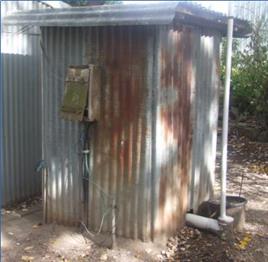
For forty years the ELECTRA POWERHOUSE "100km" fence energiser clicked tirelessly away, in that old ammo box, on the dunny wall. Forty thousand watts of energy carefully channeled to keep livestock in bounds. For forty years dutifully, every day whether rain hail or sun, I picked up my fence monitor, walked seventy five metres to the electric fence, clipped the leads to the wires, (forever fearful of accidentally connecting the bare earth clip to the hot wire) and verified all was well with my fencing. ..That's 2160 km I've walked just doing this chore! Finally, one day as the forty first year commenced, the penny dropped, ……. THERE MUST BE A BETTER WAY! And so, what I now present slowly developed from concept to a well proven design.
A working fence monitoring system is presented that monitors the fence in a way every person can understand . The design should suit any system, except those of the lowest power which may need a differently rated current probe. This project delivered into the public domain is now well proven, using comparison techniques emulating those used for fault finding in industry.
The difficulty of working with high voltages is gone. Fence current is measured using a clamp around the energiser earth wire. A reference pulse from a fence in good operating condition is taken on a dry day, and, additionally from 2026, a wet day. Faults are determined according to how a fence pulse deviates from normal.
The difficulty of working with high voltages is gone. Fence current is measured using a clamp around the energiser earth wire. A reference pulse from a fence in good operating condition is taken on a dry day, and, additionally from 2026, a wet day. Faults are determined according to how a fence pulse deviates from normal.
The key idea:- Every fence presents an unique ‘signature’, and we look for changes in the signature that may indicate a fault has developed.
Kitchen display is simple. One switch to cut out alarm, one button each to store dry and wet day reference pulses
Kitchen display is simple. One switch to cut out alarm, one button each to store dry and wet day reference pulses
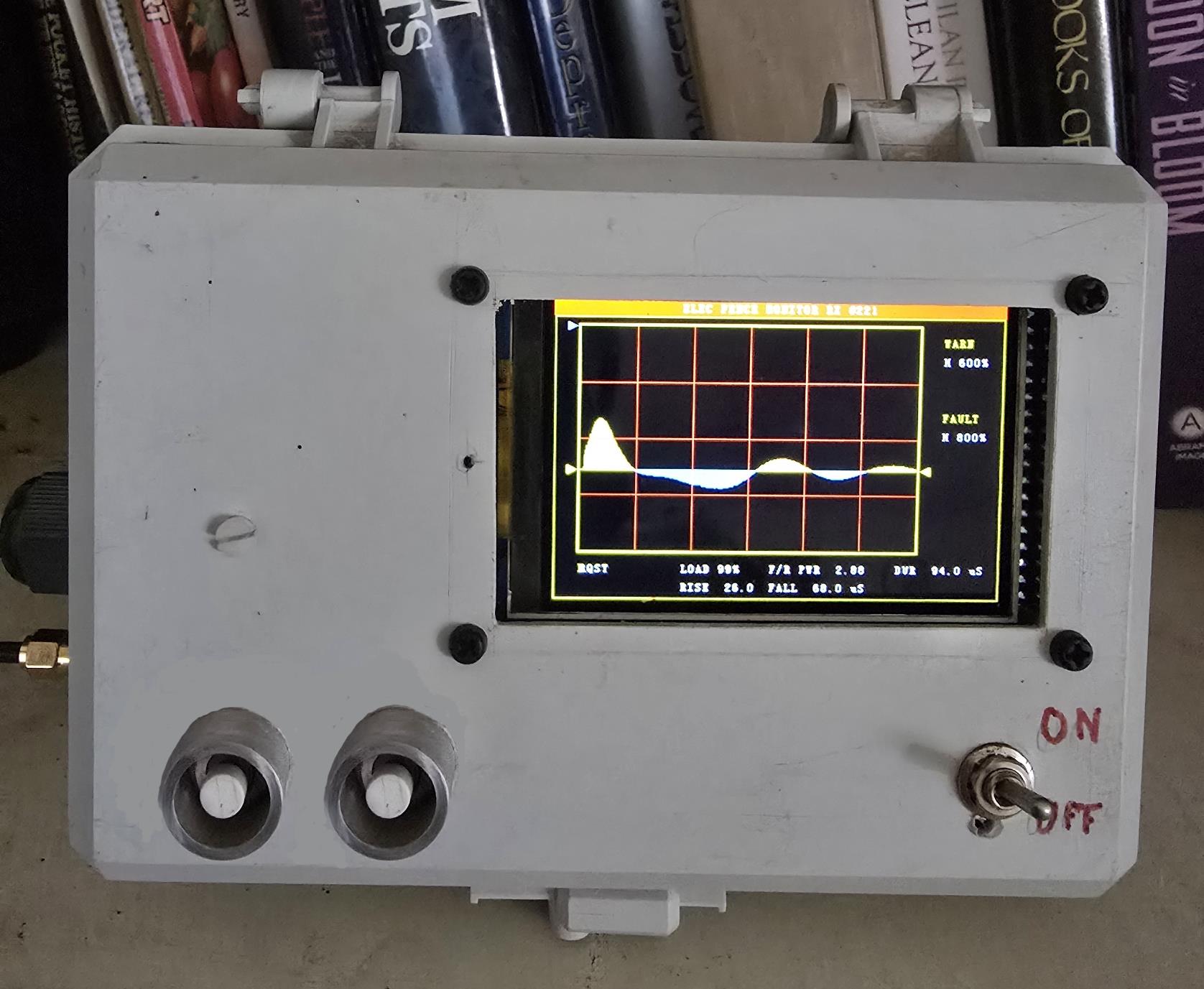
A data set captured from a clear fence on a warm dry day is initially stored, and becomes the “dry day”reference pulse.
To store this, button beside the display is pressed and held until “DRY DAY PULSE STORED”
This is only ever done once, unless there are changes made to the fence structure.
A data set captured from a clear fence on a wet day is stored, and becomes the “wet day”reference pulse.
To store this, button beside the display is pressed and held until “WET DAY PULSE STORED” is displayed
This is only ever done once, unless there are changes made to the fence structure. As there may be some time after commissioning before there is a wet day, factors gained from experience are used, but fault diagnosis may not be precise.
With experience the graphical display of trace on screen quickly lets you differentiate between a normal and faulty fence,
It is a little harder to decide between a distant short circuit and an apparent ‘short’ caused by several hundred meters of damp grass and ground, except that the latter may be normal, and will disappear as the day warms up.
To supplement the trace, the screen has added reports, and audible alarms alarms are given. Type and duration of the alarms depend on nature and severity of the fault.
Those odd build numbers you see on the firmware downloads just reflect project development. Build #222 represents 22nd revision of the receiver, Build #307 indicates 7th revision of the transmit end.
To store this, button beside the display is pressed and held until “DRY DAY PULSE STORED”
This is only ever done once, unless there are changes made to the fence structure.
A data set captured from a clear fence on a wet day is stored, and becomes the “wet day”reference pulse.
To store this, button beside the display is pressed and held until “WET DAY PULSE STORED” is displayed
This is only ever done once, unless there are changes made to the fence structure. As there may be some time after commissioning before there is a wet day, factors gained from experience are used, but fault diagnosis may not be precise.
With experience the graphical display of trace on screen quickly lets you differentiate between a normal and faulty fence,
It is a little harder to decide between a distant short circuit and an apparent ‘short’ caused by several hundred meters of damp grass and ground, except that the latter may be normal, and will disappear as the day warms up.
To supplement the trace, the screen has added reports, and audible alarms alarms are given. Type and duration of the alarms depend on nature and severity of the fault.
Those odd build numbers you see on the firmware downloads just reflect project development. Build #222 represents 22nd revision of the receiver, Build #307 indicates 7th revision of the transmit end.
THE ORIGINAL DESIGNS ARE STILL RECOMMENDED for those not needing a web page or phone display, and are happy with only a TFT display in the kitchen. Both dry and wet day reference pulses are now used to improve fault detection.
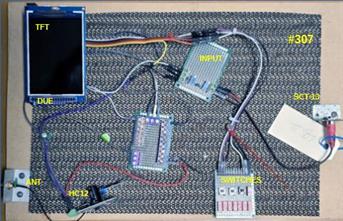
LEGACY BUILD #307 The sending end, at the energiser, away at the shed, sends by wireless to LEGACY BUILD #222 The receiving end, in the kitchen..
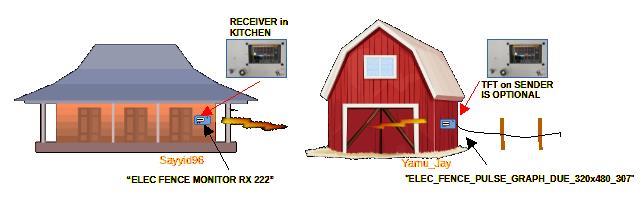
The simplest display for those who want no phone or email
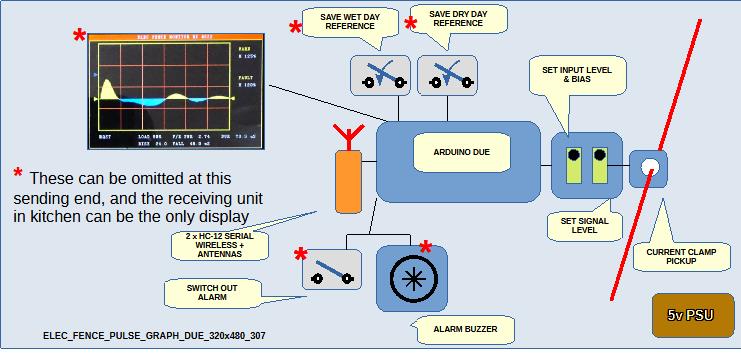
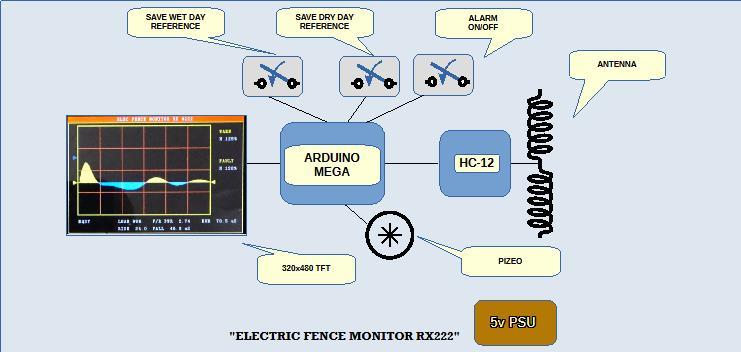
The "ELEC_FENCE_PULSE_GRAPH_DUE_320x480_307" is interrogated (per HC12 wireless link) by your "ELECTRIC FENCE MONITOR RX222" in the homestead kitchen. Fence pulse will be shown also at sender on TFT.
The TFT, pizeo, and reference PB switches are coded, but do not need attaching if this external display is not needed or if it is so remote no one would hear it. Having a display at sender would normally only be useful on properties where farm employees would not normally have daily access to the farm kitchen
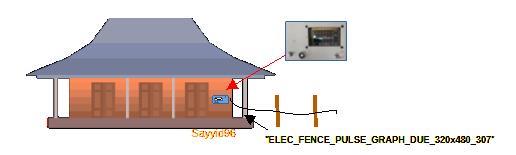
AN OPTION WHERE FENCER IS MOUNTED AT HOMESTEAD. STANDALONE. Simple and quick to build.
The same sender program ( "ELEC_FENCE_PULSE_GRAPH_DUE_320x480_307") can now be compiled for standalone use where fencer unit is at homestead. In this case, the TFT will be located at the fencer, because the pulse pickup is on the fencer earth lead. This version now runs standalone by tying “ModeSelectorPin”,
programmed as pin 11 on Arduino Due, to ground.
The "ELEC_FENCE_PULSE_GRAPH_DUE_320x480_307" is interrogated (per HC12 wireless link) by your "ELECTRIC FENCE MONITOR RX222" in the homestead kitchen. Fence pulse will be shown also at sender on TFT.
The TFT, pizeo, and reference PB switches are coded, but do not need attaching if this external display is not needed or if it is so remote no one would hear it. Having a display at sender would normally only be useful on properties where farm employees would not normally have daily access to the farm kitchen
AN OPTION WHERE FENCER IS MOUNTED AT HOMESTEAD. STANDALONE. Simple and quick to build.
The same sender program ( "ELEC_FENCE_PULSE_GRAPH_DUE_320x480_307") can now be compiled for standalone use where fencer unit is at homestead. In this case, the TFT will be located at the fencer, because the pulse pickup is on the fencer earth lead. This version now runs standalone by tying “ModeSelectorPin”,
programmed as pin 11 on Arduino Due, to ground.
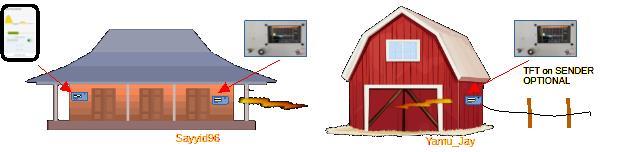
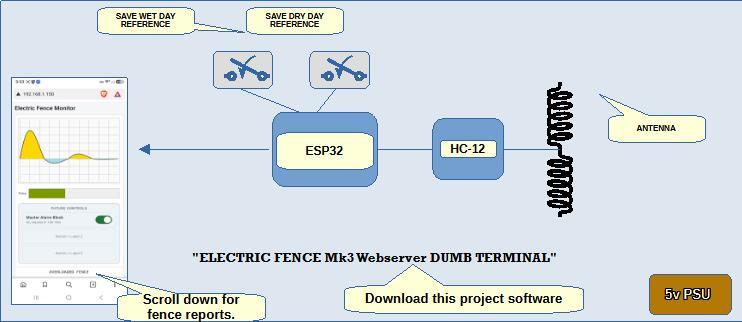
“DUMB TERMINAL” A new program is provided for those already using existing ‘LEGACY’ builds, allowing phone or PC access to the pulse waveform without replacing or modifying any existing hardware or software.
THIS EXTENDS THE FUNCTIONALITY OF AN EXISTING SEND / RECEIVE PAIR. (RX #222, TX #307)
This is a "PACKET SNIFFER", GIVING A SECOND DISPLAY ANYWHERE WITHIN THE EXISTING SERIAL WIRELESS COVERAGE, PLUS, ADDS a WEBSERVER enabling fence to be monitored on PHONE OR PC.
THIS EXTENDS THE FUNCTIONALITY OF AN EXISTING SEND / RECEIVE PAIR. (RX #222, TX #307)
This is a "PACKET SNIFFER", GIVING A SECOND DISPLAY ANYWHERE WITHIN THE EXISTING SERIAL WIRELESS COVERAGE, PLUS, ADDS a WEBSERVER enabling fence to be monitored on PHONE OR PC.
EXTEND PHONE ACCESS to your page AWAY FROM WI-FI FOOTPRINT without another SIM?
If you need phone access away from your wi-fi footprint, a free for private use program, “Tailscale”, meets that need.
‘Tailscale’ is a program that lets you view your web page on a phone anywhere once you move outside the home wi-fi network. Currently, personal use is free. (See later page) EXPERT HELP MAY BE NEEDED TO SETUP TAILSCALE
If you are not familiar with setting up computer related products, you probably need help, but setup screens are straightforward. If Tailscale is not set up properly on some phones, it will cause a more rapid battery drain than acceptable. It can also chew through your mobile data if not set correctly so only nominated apps use it (The setup defaults grab all traffic!)
If you need phone access away from your wi-fi footprint, a free for private use program, “Tailscale”, meets that need.
‘Tailscale’ is a program that lets you view your web page on a phone anywhere once you move outside the home wi-fi network. Currently, personal use is free. (See later page) EXPERT HELP MAY BE NEEDED TO SETUP TAILSCALE
If you are not familiar with setting up computer related products, you probably need help, but setup screens are straightforward. If Tailscale is not set up properly on some phones, it will cause a more rapid battery drain than acceptable. It can also chew through your mobile data if not set correctly so only nominated apps use it (The setup defaults grab all traffic!)
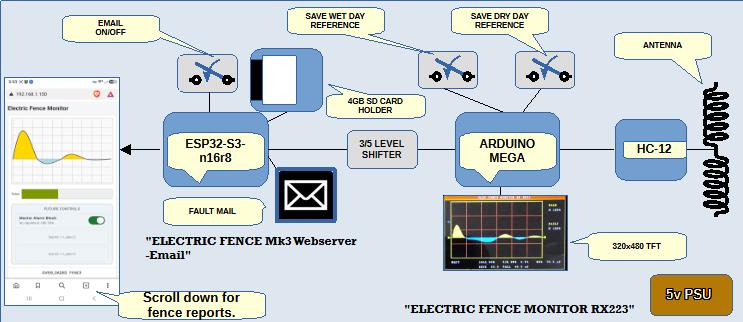
A SECOND OPTION FOR ADDING A WEBSERVER TO A LEGACY PROJECT. ADDING DIRECTLY CONNECTED COMPONENTS is an alternative way to give WEBSERVER and EMAIL FAULT REPORTS to a LEGACY PAIR. This is an improvement on the previous “dumb terminal” as it cannot miss packets, or pickup incomplete data, but you need 'in-box' additions. THE EXISTING RX223 can have the ESP32 directly connected to give these extra services.
1. Re-flash the MEGA with “ELEC FENCE MONITOR RX 223”
2. An ESP32-S3 n16r8 is attached to Mega Serial 2 to give extra functionality.
Code for this ESP32-S3 is "ELECTRIC FENCE Mk3 Webserver-Email"
2. An ESP32-S3 n16r8 is attached to Mega Serial 2 to give extra functionality.
Code for this ESP32-S3 is "ELECTRIC FENCE Mk3 Webserver-Email"
"ELECTRIC FENCE Mk3 Webserver-Email" This program, is the simplest build with a web page display and report only, but has added email ability, sending fault reports. We are modifying a legacy project, build #222.
“ELEC FENCE MONITOR RX 223” Provides TFT display, after receiving the data sent by the
"ELEC_FENCE_PULSE_GRAPH_DUE_320x480_307". It then sends by serial to a directly connected ESP32-S3 running "ELECTRIC FENCE Webserver Mk3-Email", which will re-analyse the data, create web page and emails.
“ELEC FENCE MONITOR RX 223” Provides TFT display, after receiving the data sent by the
"ELEC_FENCE_PULSE_GRAPH_DUE_320x480_307". It then sends by serial to a directly connected ESP32-S3 running "ELECTRIC FENCE Webserver Mk3-Email", which will re-analyse the data, create web page and emails.
CAUTION: A VITAL MODIFICATION IS NEEDED to ESP32-S3 n16r8.
When you have ESP and MEGA 5v rails connected, ready to feed from external 5v PSU, if you attach programming cable to ESP32, so much current flows to the Mega with its TFT that the INTERNAL TRACK IN ESP32, from 5v pin to regulator BURNS OUT
REMEDY:- Hard wire 5v pin back to the regulator.
When you have ESP and MEGA 5v rails connected, ready to feed from external 5v PSU, if you attach programming cable to ESP32, so much current flows to the Mega with its TFT that the INTERNAL TRACK IN ESP32, from 5v pin to regulator BURNS OUT
REMEDY:- Hard wire 5v pin back to the regulator.
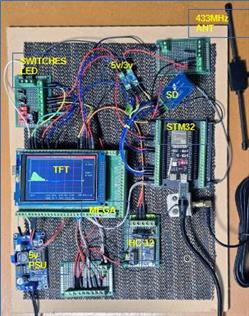

This PROJECT PRODUCES a WEB PAGE with PHONE or PC DISPLAY ANYWHERE WITHIN WIFI FOOTPRINT, but no TFT
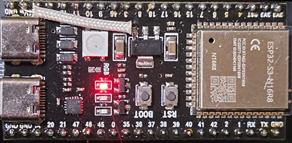
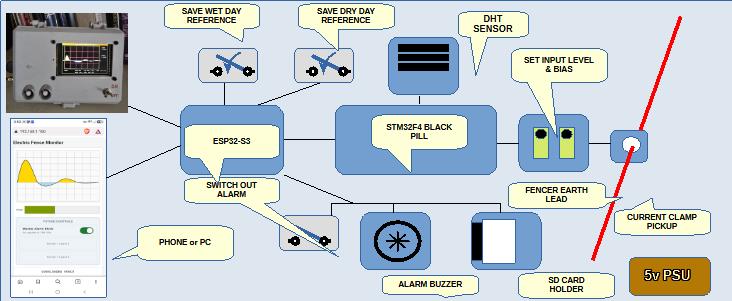
In your box are two micros. A STM32 Black Pill to capture the pulse, an ESP32 to provide the web page.
In your box are two micros. A STM32 Black Pill to capture the pulse, an ESP32 to provide the web page.
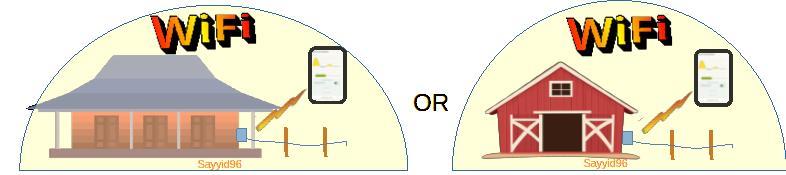
"ELECTRIC FENCE Mk3 Webserver" This program, is the simplest build with a web page display and report only, and is for situations where fence energiser sits within the farm wifi footprint.
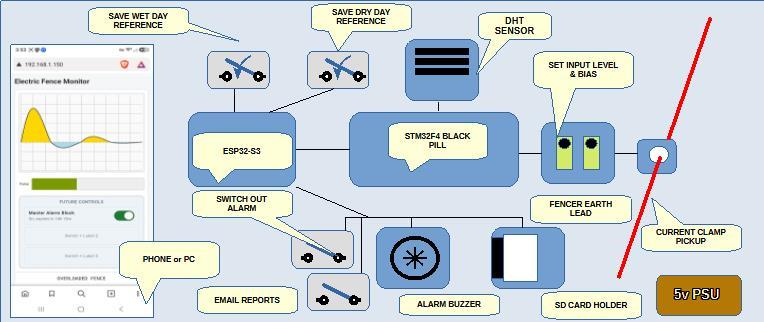

The new 2026 projects are a further development of the successful earlier project.
They take advantage of wi-fi, web page, and wireless links to simplify, and add features to the original concept. They no longer use the Arduino Due, an obsolete board. (but still available as at Sep 2026!)
They take advantage of wi-fi, web page, and wireless links to simplify, and add features to the original concept. They no longer use the Arduino Due, an obsolete board. (but still available as at Sep 2026!)


Download. All the following detail, plus important BUILD NOTES are in these "FENCE MONITOR NOTES"

Download code for "ELECTRIC FENCE Mk3 Webserver" for ESP32_S3

Download code for "ELEC_FENCE_PULSE_GRAPH_DUE_320x480_307"
Download code for "ELECTRIC FENCE MONITOR RX222"
Download code for "ELECTRIC FENCE Mk3 Webserver-Email"
Download code for “ELEC FENCE MONITOR RX 223”
Download code for "ESP32 Farm water monitor and pump control Web Server".
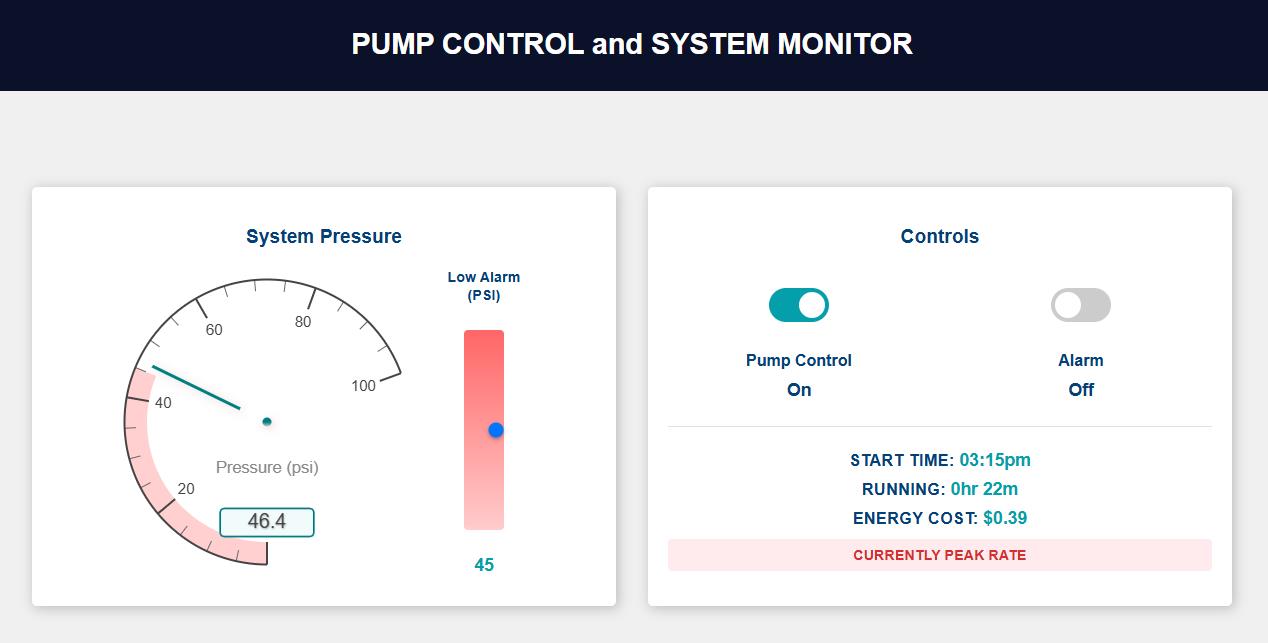
Switches a radio link TX, monitors line pressure. The low pressure alarm is adjustable from screen, and for fun your pump running costs are displayed.
Continual monitoring of line pressure is perfect for those with cattle who continually manage to intefere with ball valves, or who manage to undermine feed pipes around the trough. Essential for those with piping exposed to winter frosts. Notes in code header explain all you need to complete this project. Those needing to use control and monitor can use 'Tailscale' to do this without extra sim. The project notes for the project above (fence monitor) explain tailscale in more detail
Switches a radio link TX, monitors line pressure. The low pressure alarm is adjustable from screen, and for fun your pump running costs are displayed.
Continual monitoring of line pressure is perfect for those with cattle who continually manage to intefere with ball valves, or who manage to undermine feed pipes around the trough. Essential for those with piping exposed to winter frosts. Notes in code header explain all you need to complete this project. Those needing to use control and monitor can use 'Tailscale' to do this without extra sim. The project notes for the project above (fence monitor) explain tailscale in more detail
A simple project, monitor and control farm water system from phone or PC
Above. Dashboard for phone or PC with pump control and pressure gauge with settable low pressure alarm
A bonus is the run costs, but the basic cost parameters and pump kilowatts must be programmed in code.
A bonus is the run costs, but the basic cost parameters and pump kilowatts must be programmed in code.




WEB PAGE and PC DISPLAY ANYWHERE WITHIN WIFI FOOTPRINT , with phone, PC, and TFT.
(Identical to previous project except now adds a TFT DISPLAY)
In your box are two micros. A STM32 Black Pill to capture the pulse, an ESP32 to provide the web page.
"ELECTRIC FENCE Mk3a Webserver" A modified Mk3 Webserver to incorporate a local TFT display of the fence pulse, but this version does not have email reports.This program, has both local TFT (at fence energiser) and web page display and report, and is for situations where fence energiser sits within the farm wifi footprint.
(Identical to previous project except now adds a TFT DISPLAY)
In your box are two micros. A STM32 Black Pill to capture the pulse, an ESP32 to provide the web page.
"ELECTRIC FENCE Mk3a Webserver" A modified Mk3 Webserver to incorporate a local TFT display of the fence pulse, but this version does not have email reports.This program, has both local TFT (at fence energiser) and web page display and report, and is for situations where fence energiser sits within the farm wifi footprint.
Download code for "ELECTRIC FENCE Mk3 BLACK PILL" for STM32 black pill.


Download code for "ELECTRIC FENCE Mk3 BLACK PILL" for STM32 black pill.
Download code for "ELECTRIC FENCE Mk3a Webserver" for ESP32_S3.
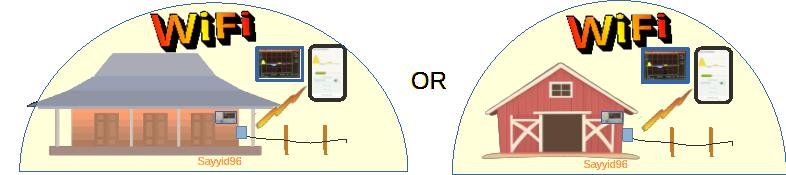


ONLY PHONE or PC REPORTING. Suits where fencer is remote from homestead and a radio link is needed.
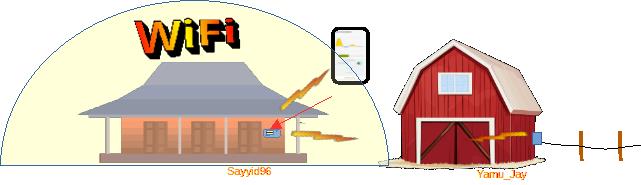
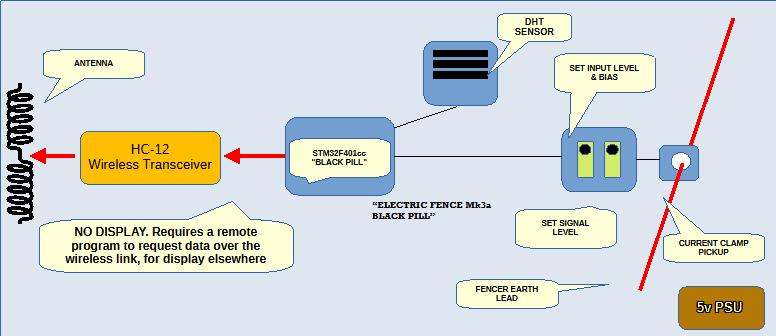
Above: Away from the homestead:-"ELECTRIC FENCE Mk3a BLACK PILL" This is "ELECTRIC FENCE BLACK PILL Mk3" with a connected HC-12 to serve, on request of another HC-12, the waveform it has captured needed by remote units. It serves packets using PulseTransfer library
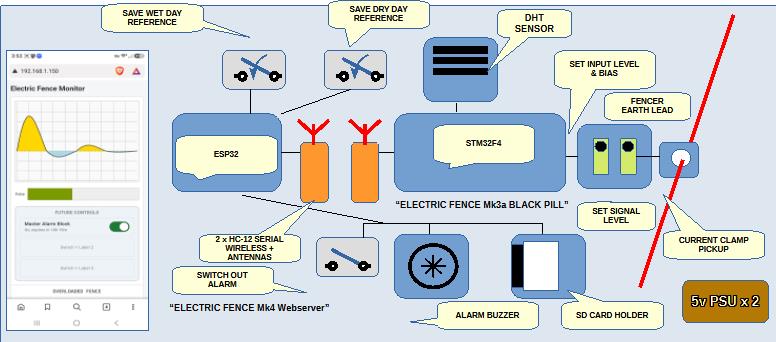
Above: At the homestead:-“ELECTRIC FENCE Mk4 Webserver” A build to suit where the fencer unit is remote from the homestead wi-fi footprint, but wishes to use the wi-fi ability to offer a web page display. Web page, local TFT optional.
This program requests packets from a STM32 BLACK PILL, (Running " ELECTRIC FENCE Mk3a BLACK PILL")
This program requests packets from a STM32 BLACK PILL, (Running " ELECTRIC FENCE Mk3a BLACK PILL")
Download code for "ELECTRIC FENCE Mk3a BLACK PILL" for STM32 black pill.
Download code for “ELECTRIC FENCE Mk4 Webserver” for ESP32_S3.


Download code for "ELECTRIC FENCE Mk3 Webserver DUMB TERMINAL"
Download code for "ELECTRIC FENCE Mk3 Webserver DUMB TERMINAL"
These are advanced projects. As always, your author offers no help. Don't start unless you have a good understanding of what is involved. The frmware itself is excessively commented, but the build notes (see earlier download button) contain more useful info.
EXPLAINING THE ‘BLACK PILL’ USE.
Because the ESP32 has a very slow ADC, we must use the fast read ability of the ADC on the STM32 back pill as the cheapest and easiest way to sample the fence pulse at 1.2us intervals. The old Arduino Due handled this easily, but these are classed as obsolete, so we have moved to new platforms.
Because the ESP32 has a very slow ADC, we must use the fast read ability of the ADC on the STM32 back pill as the cheapest and easiest way to sample the fence pulse at 1.2us intervals. The old Arduino Due handled this easily, but these are classed as obsolete, so we have moved to new platforms.
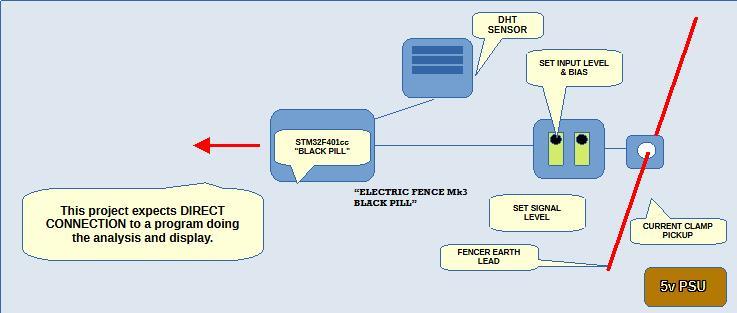
Below:- "ELECTRIC FENCE Mk3 BLACK PILL" This is needed to feed data to all directly connected ESP32 webserver programs in this suite.
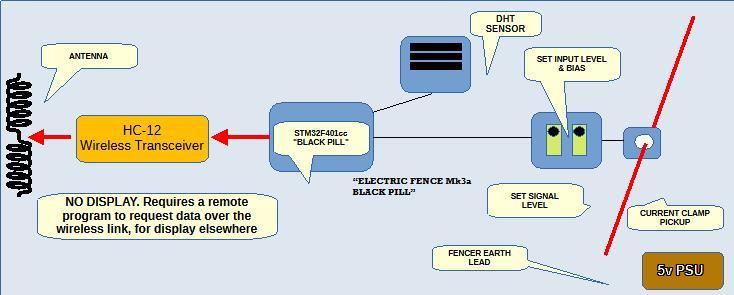
Below:-"ELECTRIC FENCE Mk3a BLACK PILL" This is "ELECTRIC FENCE BLACK PILL Mk3" but with a connected HC-12 wireless serial module to serve, on request of another HC-12, the waveform it has captured needed by remote units. It serves packets using a custom PulseTransfer library produced by my "Cursor" assistant
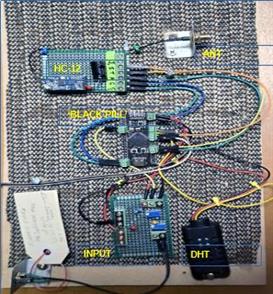
Above: The STM-32 and ESP32-S3 combination provide TFT and phone display and reporting to monitor an electric fence.
Above: The STM-32 and ESP32-S3 combination provide PC or phone display and reporting to monitor an electric fence.
Above: The STM-32 and ESP32-S3 combination provide TFT and phone display and reporting to monitor an electric fence, but only operate within the farm wifi footprint.
Left: Illustrating how a wireless serial link is used to bring data to homestead from remote electric fence unit which sits outside the farm wifi footprint
Above: Diagram illustrates signal flow of dumb terminal capturing fence pulse data flowing between existing TX / RX pair.
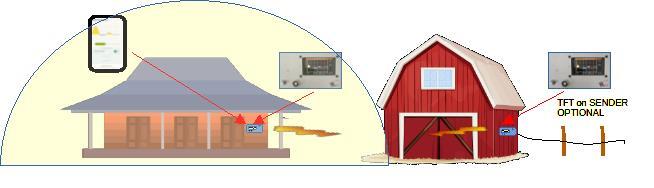
Left: Illustrating the dumb terminal offers extra displays of the electric fence pulse flowing between an existing TX / RX pair.
Left: For phone or PC display of your electric fence pulse, your webserver sits within the farm wifi footprint. Where the pulse is gathered outside that footprint, it must come back to the homestead through the wireless serial link.